Saturday, June 15, 2024

LO3: Following codes and conventions

UTOPIA Arts fits into real magazine codes and conventions of the small art business genre and targets audience of middle aged women because:

Front cover

The Photos I will use on my front cover features middle aged women that the reader can relate to and are encouraged to view them as an ideal self to do this I have taken Laura Mulvey's male gaze theory into consideration and subverted the male gaze by dressing my model appropriately. As the model's costume is an apron and hoodie it's relates to art genre and is also relatable to the target audience as hoodies are a mainstream clothing item. I have followed magazine codes and conventions with my main image and secondary image as I have featured a smiling mid shot of my model's on the front cover, used complimentary colours and as my focal point is sharing the eye line with the viewer it engages them to read the magazine. The lighting in my magazine is also a convention in art and small business magazines as warm daylight is relatable, comforting and connotes warmth and calm.


Front cover used to inspire me 

'Aesthetica' is an art and photography magazine. I used this magazine to help me understand and follow art magazine codes and conventions.

Like 'Aesthetica' in my main cover image I have focused on photographing one model and positioning them to be in the middle of the page. However instead of posing my model in a side view looking away from the reader like this front cover, I decided to take a forward facing photo so that the model eye line is directed at the reader. I did this in order to follow magazine conventions. by doing so I believe I am straightforwardly directly targeting my reader, unlike 'Aesthetica' that uses mystery and non conformity of magazine conventions in this main image to draw in the reader.

In my magazine I have used a secondary cover image I think this makes my magazine more appealing because it gives the reader more to look at, and allows them to understand visually that this magazine will feature people that look like the target audience. My secondary cover image connotes the theme of art and gives the reader an idea of what to expect from the contents of 'Utopia Arts'.

'Aesthetica' layout consists of a main image featuring a bold colour, along with at the top of their page a masthead and banner and at the bottom of their page bar code. Their house style includes white banners showing cover lines estimated to be in a size 8, they are positioned so that they don't interfere with the main cover image. All of their text is in a black serif font this causes high contrast with the background making their text professional and easy to read. Unlike my magazine 'Utopia Arts' They do not present a secondary images, buzz words or multiple graphics in their front covers to entice the viewer instead I think they rely on mystery and their well know brand name to advertise their product to the reader.

In this 'Aesthetica' front cover they chose a red colour scheme. This colour scheme is seen in the red circle graphic, the models costume is a red vest top paired with a sheer white blouse with red polka dots, the red fabric backdrop. I think this colour scheme works well to entice artists and photographers as its visually appealing and well planed. I could have followed their planning and created a similar colour scheme in my main cover image by instead of using yellow I'd use blue in my graphics to match my models blue apron, however I wanted to use a colour with happier connotations that would help me to stereotypically target middle aged women.

Because 'Aesthetica' red circle graphic is blocking out the models face this causes the audience to struggle to identify with the model, I think they target a wider audience by making her non descript. Where as in 'Utopia Arts' I have limited my audience to women. Their main target audience for this magazine are adults women because this image is not targeted at the male gaze. Their secondary audience are adult men, I think this because red is a stereotypically masculine colour and their design is not stereotypically femenin while still featuring only a female model.

Due to only using one word and designing their text larger in their masthead than tag lines 'Aesthetica' follows magazine conventions. Their masthead has influence my own design as I have also created a mastheads with a white background and black text in a serif font that is large and central at the top of the page. This help the audience easily identify my magazine brand and connotes my calming theme because of its plant graphic and elegant font.  

Unlike 'Aesthetica' my magazine includes many cover lines placed on the cover image instead of only in the banner because I wanted to follow magazine conventions. 'Aesthetica' only uses a banner because they favorizes photography. I also included a banner because I wanted to show my readers that their is allot of reading material for them in this magazine. In my cover lines I have used allot of buzz words such as Win and New unlike 'Aesthetica' as they only use cover lines with technical terms because they are targeting people in the art and photography industry.

Like 'Aesthetica' I have included a barcode in the corner of my page so that my audience can easily identify the price of the magazine. Unlike 'Aesthetica' I have used two puff's to draw in the reader with buzz words and clear information, this information denotes my magazines contents.


DPS & DPS used to inspire me

I used this 'Aesthetica' magazine double page spread to inspire my DPS as it is an art and photography magazine. I have followed codes and conventions of a magazine double page spreads by using columns for my text. The text itself follows conventions as the article body text is in a size 12, this size is the most common for magazine body text. I have followed my house style as I have used the serif font Baskerville old face.

My images fit my magazines art theme as they have been taken in art settings; in front of a pottery kiln and in a art workshop. They also fit my small business theme as the images are of a small business owner and their work space.

As my model is the only person in these photos, making her the focal point, this connotes her important to this double page spread, insinuating to the viewer that this women is the person being interviewed. This follows image conventions as in the Aesthetica DPS the light show pictures in the double page spread insinuates its the source material for the article.

Instead of following conventions and using images that take up all of or half of one page, I chose to priorities my article. This is because my readers are primarily interested in reading large amounts of text. The eye line of the model in the main image engages the reader as it targets them. I have also engaged my target audience of middle aged women by representing them with my middle-aged female model and my secondary audience of young adult women by using stereotypically femenin themes in my stories such as crafting and artwork.

Like 'Aesthetica' I used the same colour scheme on both pages so that they are cohesive as I have used my house style colours my DPS is cohesive with the rest on my magazine. 

The graphics I have used connote growth and movement and create synergy and brand recognition due to there uniqueness.


Contents page & contents page used to inspire me

As I have used my main cover image in my contents page the eye line of the model is directed at the reader creating engagement. I have also used an image I took of a bee on a flower, this links to my natural contemplation story, this image connotes happiness as the flower and bee are a bright yellow. I have taken a photo of the local gallery 'the site gallery' to link to my magazine theme of art and my contents page story 'natural contemplation'. To link to my 'sally's  Macrame' story I took a photo of a mcrame plant holder, due to the denotations of nature this image connotes peacefulness. As this image presents a hand made decretive product it links to my theme of art. Finally I have taken multiple images that relates to my magazine theme of art featuring art instillations local to Sheffield, I chose to photograph these locations to link to my 'colours impact' story, they feature vibrant colour in an urban gray landscape this causes them to connote individuality due to their contrast with the landscape. 

My layout for my contents page has changed from my initial plan seen in my visualization diagram as I needed to alter my layout to fit in the images that I had taken. The layout I ended with connotes good organization and professionalism due to its minimalism aesthetic, my layout follows conventions seen in Aesthetica contents page as I have used even placement with images and text. I have followed conventions with my images as they use similar colour schemes and aesthetics this is seen in the Aesthetica contents page as they have chosen images with different subjects in either blue or yellow so that they are cohesive.

The colour scheme of this page matches my house style colours of white, black, sage green and mustard yellow. I have chosen these colours as they connote happiness, tranquility and nature. This reflects my magazines values as I want to relax the reader and give them content they will enjoy. 

The graphic vines I created are featured throughout my magazine to create synergy and brand recognition due to there uniqueness.

My house style serif text is featured in my contents page as I have used the font Baskerville Old Face. This font connotes intelligence and professionalism due to how its minimalism aesthetic. The size of my text follows conventions as my headings are lager than my body text, this is proven as a convention as the Aesthetica contents page has also done this.

My main target audience of  middle aged women are targeted as I have included my front cover main image with a middle-aged female model. My secondary audience of young adult women have been targeted as I have photographed stereotypically femenin objects such as decoration and flowers.


LO2: Fonts, graphics, house style colours

Front cover


Fonts

The Font I chose 'Baskerville Old Face' is suitable for my target audience as it has connotations of being mature, clean, stylish and easy to read. Having a clean simplistic font will represent the brand of  UTOPIA  Arts as timeless and well though out.

Graphics

As I am targeting small art business owners they stereotypically enjoy greenery and are interested in the plant life that can help to support climate change. That is why I chose to use leaf graphics on my front cover, but it is also because plant life connotes relaxation and calm representing my magazine as something that would be calming to read.

House style colours

I chose Yellow as it connotes happiness and the sun. And Green as it connotes nature, movement and suggests forward thinking. My audience will find this colour pallet intriguing and appealing as sage green is currently popular in the media today. I also chose black on white as it is simple and classic.


Double page spread


Fonts

The font I chose in my DPS is the serif font 'Times New Roman' I chose this because it is professional 

Graphics

In my DPS I will use less graphics than on my front cover because I want the reader to focus on the text, however I have still used some small vine graphics.

House style colours

I chose a mustered colour for the background to draw the readers attention and white boxes for the text so that it is easy to read. I used black text for the article and black text in bold for the competition advertisement and any other important information. I used all caps to state the person that is answering my questions. I will mainly use rectangular and Squair shapes to connote professionalism and simplicity and keep in line with article conventions.  


                                           Contents page

Fonts
I chose to use the font Baskerville old face in my body text, numbers and heading. I chose this font because it looks professional and its easy to read, this fits the business theme of my magazine.

Graphics
I chose to use a vine graphics in my background and foreground to connote movement, I did this to encourage my viewer to explore the magazine. As these vines denote nature it connotes the calming affect of reading my magazine.

House style colours
I have consistently used my house style colours of sage green and mustard yellow to make my magazine cohesive. This causes my magazine brand to be represented as well thought out and professional. I used large text for my heading and numbers so that the viewers attention is drawn to them.


LO2: Visual styles and themes moodboard

Front cover 


Contents


DPS


front cover visualization diagram


Contents page visualization diagram


double page spread visualization diagram


LO2: Annotated visualization diagrams


Monday, April 29, 2024

LO4: front cover: Evidence of editing, version controls, review of assets, client and audience feedback

Front cover

Assets


UTOPIA Arts version 1 


Version 2

In this version of my edit I experimented with the warmer 'sunshine filter' to emphasis the cozy and relaxing eathsteatic of my magazine. However I felt the filter causes the model to blend into the background making it not stand out enough.

However in this version I didn't like the shade of yellow so this was later changed, and due to seeing my masthead enlarged I have decided I want to decrease the size of masthead to look more elegant 


I selected the shade of yellow I am happy with to create the borders.

Finalize the layout version 3


I added my 'Win' asset that I created with the pen tool using the brush tool 100. I want to change the white background colour to cream so that it looks more interesting.

I neatened up the yellow boarders using the pen and lasso tool to create straighter lines. 

I changed the image size and its position so that the model is the main focus of the front cover but we can still see the pottery in the background. 

I added a white box for secondary image to be placed over top.


I isolated the models hoodie using the magnetic lasso tool and increased saturation of hoodie 


version 4 


I decreased opacity added secondary image added text.

version 5


I added green text to my cover lines however I feel it clashes too much to the yellow background.

I changed the typography on 'win' and 'patterns' to be more cohesive with my magazine. 

I increased the opacity on main heading as it is the most important story on the front cover.

version 6 


I made the text larger and changed the dark green text to white as it is easier to read.


I have done a quick digital sketch of graphics I want to add that weren't in my original plan, I've added these graphics because I thought the main story line was to bear and didn't draw attention enough and I felt the magazine overall was lacking in its nature theme so to combat this I will depict vines that will be used as borders.

I added another white graphics in the bottom left corner as it looked to bare.


I re-used asset surrounding circle 1 and rotated it for circle 2.


I re-used asset graphic from the top left of the magazine to draw interest to the main cover story. 

version 7 


I added text in circle 2 


I used google to find a non copywrite barcode website so that I can add a barcode to my magazine without facing copywrite issues.


I added the prince and location above the barcode using the text tool and used the same font: Baskerville old face, in size 10, to keep the magazine looking consistent.

version 8 


version control: version 1 vs version 8 

In version 8 of my magazine's front cover you can see that I kept the yellow borders, main cover image and most of the masthead from version 1 however I changed the leaf graphics on the 'A' as I felt it needed to look cleaner and more sophisticated. And I decreased the sizes and position of the masthead and main cover image. Adding more graphics to my front cover has made it look more interesting and appealing.


Version control DPS

Version 1
 
In version one I created my layout by following my pre-production document, I added in my article text in the correct font and size so that I could position it to my liking. 

Version 2

In version 2 I added in my edited article, editors note, pictures and rearranged the layout of my white box's and text to appear more visually appealing and easy for the audience to read.


Version 3

In version 3 I changed the layout in the bottom right corner, added in a graphic, changed one of my images as it didn't relate to my story's theme and added in a mini story relating to my new image because I wanted to fill in unused space. I also added more information to my work shop section.

Version 4

In my final version I have added in more graphics to give off a friendly aesthetic and make the page more visually appealing and interesting to the viewer.

                               Version 1 vs 4

V1 has been improved in V4 to look allot more like my original layout plan, in V1 I found it hard to replicate my drawn out plan in a digital platform but I think in V4 I have succeeded in my replication.
In V4 I have adapted to my body text and used the space of my DPS well. Compared to V1 V4 is allot more visually interesting because of the graphics and images I added in. The images and graphics I used relate to my body text and are on theme, this creates some visual story telling for the reader, this means the reader will be quickly engaged and interested in V4, however as V1 only has the body text and headline some readers would initially find this to boring to be engaged.


Review of assets

Front cover 


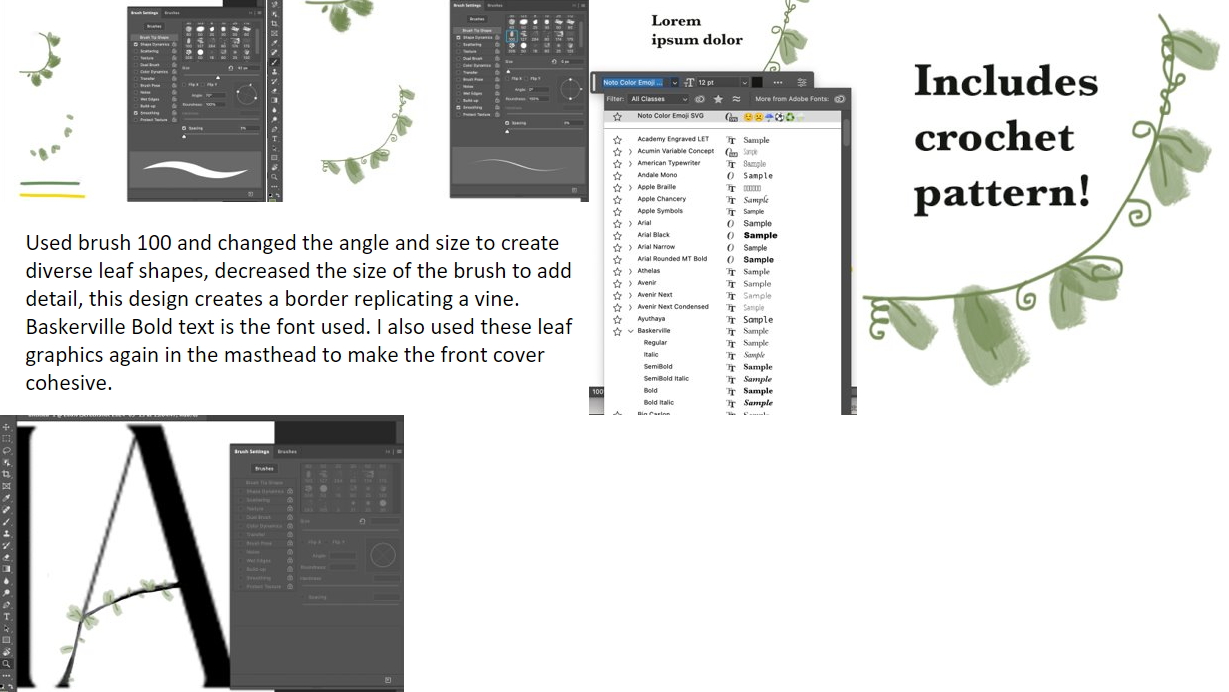
I have continuously used the same brush tool for the leaf pattern to make the front cover cohesive and only changed the size and angle of the leaf as well as added swirls to resemble shoots for texture.  


This vine boarder matches my other leaf graphics as I used the same brush type the swirls I added connote whimsy which relates to my art genre.


Originally I was just going to just use white text for the cover lines, but instead I decided to highlight the cover lines with yellow box's. The yellow box's are bright and eye catching and make the text stand out. The simple shape connotes the clean and minimalist aesthetic I am aiming to produce in my magazine. 

I improvements my original masthead 'A' graphic by using a shaped brush in Photoshop instead of drawing with a preset brush, I changed the branch from a 'y' shape to an 'r' shape as I felt I needed to makes the A look cleaner and more professional. 


DPS

I have replicated the doodle style well on the computer by selecting the marker brush tool. I think this art style fits my target audience well as its not too cartoonish and childish. I think this graphic makes the image I placed it on feel more personalized.


I added in the vine graphics I made to surround my main DPS image these graphics draw the readers eye and connote importance to the reader. I think this graphic targets my readers well because its relaxing and from an art perspective it interesting to look at.


I have made a paintbrush pot graphic I made to be placed in my workshop section as it relates to the subject matter. Like my Cake graphic I have replicated the doodle style well on the computer by selecting the marker brush tool. I think this art style fits my target audience well as its not too cartoonish and childish. I think this graphic makes the image I placed it on feel more personalized.


Client and audience feedback

Front cover

UTOPIA Arts Magazine (google.com)            Examples seen bellow: 

Due to this feedback I think I will thicken the font of the text that is on the white background.

Due to this feedback I will keep my magazine as it is and edit minor changes.

Due to this feedback I think It is obvious enough that my target audience is 30+ year old women.

To keep the classic and clean look I am going for I will not add any more graphics.

Due to this feedback I will keep my typography colour scheme the same.

I have also been given verbal feedback to decrease the price of my magazines to compete with competitors and align my cover lines and change the main cover line box from yellow to green to draw attention by creating contrast.


I have taken this feedback into consideration and decrease the price of my magazine and align my cover lines using the grid found in the view tab, I also experimented with a green box on the main cover line but I decided that it didn't feel cohesive with the magazine and it made the cover feel less bright and happy  so I changed it back to my original yellow shade.


DPS

https://docs.google.com/forms/d/e/1FAIpQLSfVdE8x8SWhMgicgqJnEN3EDSVc6LCHuXqRtfpMid_wdWxGqg/viewform?usp=header


100% of people said yes


My responses include:
- more plant graphics.
- more doodle graphics. 
- graphics to add dimension in the textbox's.


                                                               100% of people said yes


100% of people said yes


100% of people said yes


My responses include:
- nothing more than adding more graphics.
- change the black heading text to white?
- add a darker patterned border around some of the box's.


Because of this feedback I have decided to add more doodle graphics to my DPS such as plates cups and pots that relate to my pottery and art theme. I don't think I will change my heading colour as it creates contrast and draws the viewers eye. And I wont change the borders of my white box's as I think along with all of my text it will make my DPS to busy. 


Contents page 


Assets


I think these assets work well because I have used my house style colours to make my magazine consistent and recognisable. I have reputedly used vine graphics through out my magazine to conote calm and nature as my target audience is interested in relaxing and plant life. As my house sale and layout is simple and minimalist using these graphics has improved the movement of my viewers gaze by drawing them in with colour and interesting shapes and directional lines.

Evidence of editing


For this asset I used brush 100 and 30 in that same green I used from my other assets on my front cover and DPS using the colour pick tool. This graphic is meant to depict vines and leaves. I decreased the size of the brush using the slider and rotated the brush so that I could get a more varied and natural look.


I added in my front cover image and started to add in my text using the text tool.


I added in my headings, descriptions and page numbers. I added in boxes to plan out my layout.


I added in my assets and changed my text graphic to be the same shade of green using the dropper tool

Edited image in PowerPoint using the remove background tool to section of the sky and the mirrors reflection form gray to blue using the recolor tool so that it connoted summer instead of winter


I added in, resized and positioned my images with the move tool while using my grid so that I could keep my spacing even.

I added in the page number '4', heading, and changed the colour of my box to yellow to match my house style using the colour pick tool.


Version controls 

Version 1

In my first version I loosely laid out where I wanted my images to go basing it off of my visualization diagram. I surrounded my contents page text with images that relate to the story's advertised in the text, so that my contents page could be more visually interesting and so that the reader can quickly see what is included in the magazine.  

I added in a purple box as it contrasted with the green box and made it stand out, I did this as the story it links to is about colour.

I added in a graphics to my background and foreground to connote movement. 

I added in my text based on my visualization diagram, however I did alter some of the headings numbers and descriptions.

Version 2

In my second version I added in my images in the top section and made shore they were evenly laid out with the grid tool. In the blue box I added in some colorful images but I didn't think they matched my theme so I later changed them. 

I changed the purple box to blue so that it matched my images as it is a frequently used colour in my images so that the page looked more cohesive, however this didn't match my house style colours so I change it again.

I edited one of my headings and descriptions as I realized I duplicated the first heading '7' by accident.  

Version 3

I changed my blue box to mustard yellow to match my house style colours. I then added in my images to link to my 'colours impact' story. 

I edited my text so that I had no repeats and they all made grammatical sense.  

I added in a dark green grid pattern to my green box, I did this because when I removed my proportions grid in the view tab, I realized the page felt to flat so I added in texture with the green grid.


Version 4

Due to my feedback I found the grid i added in made it hard for the viewer to read the text so I enlarged it so that it interacted less with my text making it easier to read.

In reply to one of the comments I resaved I moved my image of the site gallery behind my graphic to create more depth and draw attention to my graphics so that they didn't blend into the background.


In comparison the my first version I think my forth version 


Feedback from google form questions 


Due to this feed back I have made some edits to my contents page:


I edited my grid effect so that it interacted less with my text so that it would be easier to read.


I moved this image behind my graphic with the arrange tool to create more depth, as one comment suggested. 


I then did the final Export of my magazine contents page. 


LO3: Creating production materials

Front cover   Double page spread   Contents page   I have made a green box with a dark green grid pattern to highlight the important informa...